
Chasing Speed Limits Across Three Million Road Segments


Part Uno of a series about building NordHUD, a heads-up display app that taught me everything wrong about how we think about map data.
OpenStreetMap has speed limit data, and I need speed limit data, so this should be straightforward. Right?
I started with a web interface, realized it wasn't built for what I needed, and ended up parsing 101 million nodes on my laptop. Here's how.
The Architecture That Seemed Obvious
The goal: build a heads-up display app that shows drivers their current speed alongside the posted speed limit. The speed lookup needs to work offline because tunnels exist, rural dead zones exist, and API costs at query-per-second frequency would bankrupt me before I hit 100 users.
So the architecture writes itself. Extract speed limits from OSM, compile into SQLite, ship with the app, query locally. Sub-10ms lookups with zero network dependency, paying once for extraction rather than per-query forever.
Simple. Clean. Almost completely wrong in the first implementation.
Attempt One: Overpass Turbo
Overpass Turbo is a web-based query tool for OSM—you write a query, see results on a map, export GeoJSON. It's great for exploring data, grabbing a neighborhood, or testing ideas before committing to a larger extraction.
[out:json];
area["name"="Sverige"]->.sweden;
way["highway"~"motorway|trunk|primary|secondary|tertiary|residential"](area.sweden);
out geom;
I used it to pull road segments for Gothenburg and it worked well enough for that scale. But extracting all of Sweden meant running queries repeatedly, manually exporting files, and stitching results together in ways the tool was never designed for. Overpass Turbo is built for interactive exploration, not bulk extraction of entire countries.
There had to be a better way.
The PBF Revelation
Geofabrik publishes daily regional data dumps containing every node, way, and relation, compressed into PBF format. Sweden's latest dump weighs in at 749 MB—the entire country's map data in a file I could download in a few minutes.
No API rate limits, no timeouts, no manual exports. Just data.
The tradeoff is that PBF is dense and weird. Ways reference node IDs rather than coordinates, so you need to build a node index, resolve references, and handle the streaming format correctly. It's not difficult once you understand the structure, but it's definitely not "parse JSON and call it a day" either.
I rewrote everything.
Parsing 101 Million Nodes
The extraction script makes two passes over the PBF file. The first pass identifies which nodes are referenced by highway ways and stores their coordinates in memory. The second pass processes the ways themselves, resolves node references into actual geometries, and extracts individual road segments with all their metadata.
// Simplified - the real code handles streaming, memory pressure, edge cases
for (const way of parser.ways) {
  if (!way.tags.highway) continue;
  if (!ROAD_TYPES.includes(way.tags.highway)) continue;

  const nodes = way.nodeRefs.map(id => nodeIndex.get(id));
  const segments = toLineSegments(nodes);

  for (const segment of segments) {
    db.insert({
      start_lat: Math.round(segment.start.lat * 1e5),
      start_lon: Math.round(segment.start.lon * 1e5),
      end_lat: Math.round(segment.end.lat * 1e5),
      end_lon: Math.round(segment.end.lon * 1e5),
      speed_limit: parseMaxspeed(way.tags.maxspeed),
      default_speed_limit: inferDefault(way.tags.highway),
      road_classification: way.tags.highway,
      heading: calculateHeading(segment),
      road_ref: way.tags.ref,
      lanes: parseInt(way.tags.lanes) || null
    });
  }
}
The numbers from a full Sweden extraction tell the story:
Nodes processed:     101,654,659
Ways processed:        8,962,041
Road ways:               432,430
Final segments:        3,117,669
Time:                      197.1s
That's 101 million nodes distilled into 3.1 million road segments, processed in just over three minutes on my laptop without a single network request. No API keys, no rate limits, no waiting for servers to respond.
This is the correct architecture.
The 84% Surprise
I expected OSM speed limit coverage to be sparse because volunteers have to physically observe every sign and tag it manually. Surely most roads would be missing this data?
Nope.
With explicit speed limit:    2,629,009 (84.3%)
Using country defaults:         488,660 (15.7%)
84% of Swedish road segments have explicit maxspeed tags in OpenStreetMap, which is far better coverage than I anticipated. The Swedish OSM community has been remarkably thorough.
The remaining 16% fall back to country-specific defaults based on road classification. Sweden has standardized speed limits—motorways default to 110 km/h, primaries to 70, residential streets to 30—so even roads without explicit tags get reasonable values. Not perfect, but sensible fallbacks for the minority of roads without explicit data.
The schema handles both cases elegantly:
CREATE TABLE road_segments (
    id INTEGER PRIMARY KEY,
    start_lat INTEGER NOT NULL,
    start_lon INTEGER NOT NULL,
    end_lat INTEGER NOT NULL,
    end_lon INTEGER NOT NULL,
    speed_limit INTEGER,              -- NULL if not in OSM
    default_speed_limit INTEGER NOT NULL,  -- Always populated
    road_classification TEXT NOT NULL,
    heading INTEGER NOT NULL,
    road_ref TEXT,
    lanes INTEGER
);
The client runs COALESCE(speed_limit, default_speed_limit) and always gets a number, while a separate flag indicates whether the value came from OSM or was inferred so the UI can communicate confidence level to the driver.
From 500MB to 140MB: The Optimization Spiral
Here's where it nearly broke me.
My first complete extraction of Sweden produced a 500MB database. Half a gigabyte for one country. Bundling that in a mobile app was out of the question—users would abandon the download, and app store reviewers would reject it outright.
The obvious fix: compress it. Gzip brought the file down dramatically, and I could decompress on first launch. Problem solved, right?
React Native's JavaScript-based decompression hit memory limits around 150MB of compressed input. The runtime allocates buffers for compressed data, decompression working space, and output simultaneously. On older iPhones with 2GB RAM and aggressive memory pressure from iOS, the app crashed reliably before finishing. I'd traded a download problem for a runtime crash.
So I had to make the actual data smaller, not just compress it better.
The optimization spiral began. Each change involved tradeoffs I wasn't sure I was getting right:
Coordinate precision. Storing lat/lon as floats used 8 bytes each. Scaled integers (multiply by 100,000, store as int) used 4 bytes and gave me ~1 meter precision. Good enough for matching roads, half the storage for coordinates alone.
Segment length filtering. Segments shorter than 10 meters added noise without helping matching accuracy. Segments longer than 1km were too coarse for reliable heading calculations. Filtering these edge cases cut row count without losing useful data.
Road type filtering. Did I really need service roads and parking aisles? Every road type I excluded saved space but risked missing a road someone would actually drive on.
Deduplication. OSM ways get split at intersections, creating overlapping segments with identical attributes. Merging consecutive segments on the same road with matching speed limits reduced redundancy—but the merging logic had to handle edge cases where segments looked identical but weren't.
Column pruning. Every column I thought I might need "someday" was costing megabytes across 3 million rows. I cut ruthlessly and accepted that I'd re-extract if requirements changed.
Each optimization required re-running the extraction, checking query accuracy hadn't degraded, and measuring the new file size. Some changes helped. Some made things worse in ways I didn't expect. A few times I broke the matching algorithm entirely and spent hours figuring out why.
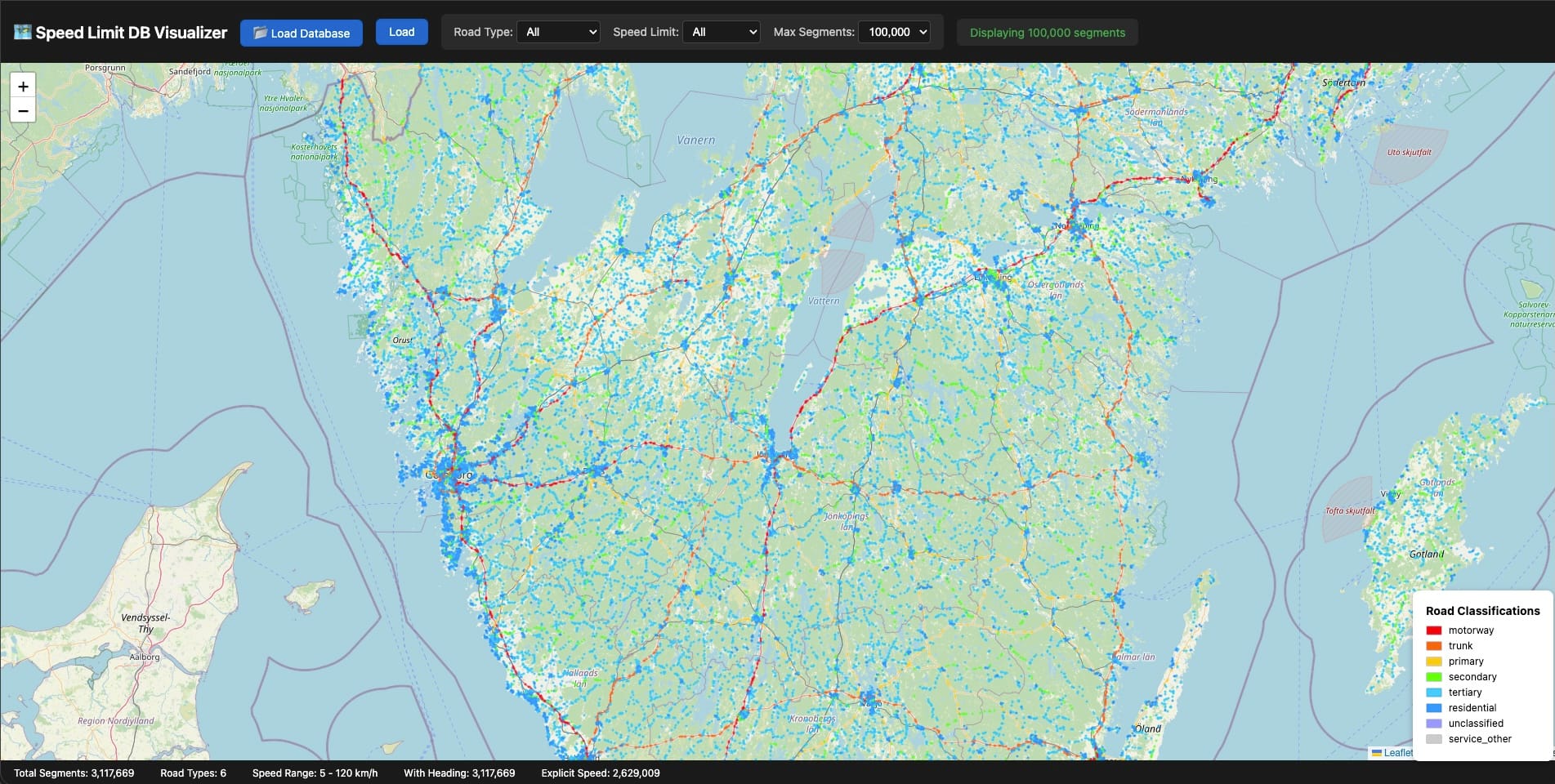
The breakthrough for debugging was building a visualizer. I threw together a Leaflet map that could load a SQLite file directly and render every road segment color-coded by speed limit. Suddenly I could see the data instead of squinting at query results in a terminal.
Gaps jumped out immediately. A motorway segment missing its speed limit. A residential area where coverage dropped suspiciously. Intersections where segments overlapped in weird ways. Some issues were bugs in my extraction logic—others were genuine gaps in OpenStreetMap itself.
When I found OSM errors, I fixed them. Edited the map and commited the changes for review, added the missing speed limits, waited for the next daily Geofabrik update, re-extracted. It felt good to contribute back to the dataset I was relying on so heavily. Open source working as intended.
500MB became 300MB. Then 200MB. Then finally 140MB.
The whole process took weeks of iteration. It's not the kind of work that makes for good commit messages or impressive diffs... just slow, grinding progress toward a number that felt arbitrary until I hit it.
SQLite: The Unsung Hero
I want to take a moment to appreciate SQLite, because it doesn't get nearly enough credit for what it enables.
This database engine ships on every smartphone, handles terabytes of data without breaking a sweat, and requires zero configuration, zero server processes, and zero network ports. The entire database is a single file you can copy, email, or sync however you want.
For NordHUD, SQLite eliminates the need for any backend infrastructure for speed limit queries—the data lives entirely on the phone. Queries complete in 3ms typically, under 10ms even in worst-case scenarios, with no network round-trip and no cold start latency to worry about. It just works, even in tunnels where your cellular connection doesn't.
Updates are beautifully atomic: download a new database file, swap it in, done. No migration scripts, no schema versioning headaches, no partial update states to handle.
When people ask what database to use for mobile offline data, the answer is SQLite until you have a very specific reason to choose otherwise. You probably don't have that reason.
Points vs. Line Segments
Early versions of the schema stored road segment centroids—one lat/lon pair per row. Fast queries, completely wrong results.
Consider a highway overpass. Your GPS says you're at coordinates (57.7089, 11.9746), and you need to find the correct speed limit. The highway segment's centroid is 40m away horizontally, but the residential street below the overpass has a centroid only 15m away. Nearest-point matching picks the residential street every time, which means you see "30 km/h" on your HUD while doing 110 on the highway above.
The fix requires storing line segment endpoints and calculating point-to-segment distance rather than point-to-point distance:
function pointToSegmentDistance(px, py, x1, y1, x2, y2) {
  const dx = x2 - x1;
  const dy = y2 - y1;
  const lengthSquared = dx * dx + dy * dy;

  if (lengthSquared === 0) return Math.hypot(px - x1, py - y1);

  const t = Math.max(0, Math.min(1,
    ((px - x1) * dx + (py - y1) * dy) / lengthSquared
  ));

  return Math.hypot(px - (x1 + t * dx), py - (y1 + t * dy));
}
The algorithm projects your query point onto the infinite line containing the segment, clamps that projection to the actual segment bounds, then calculates the distance to the clamped point. It's not rocket science, but it's surprisingly easy to get wrong when you're thinking in terms of points rather than geometry.
The Heading Problem
Picture two parallel roads running 10 meters apart. One is a 70 km/h arterial heading north, the other a 30 km/h service road heading south. GPS accuracy sits around ±10m on a good day. Which road are you actually on?
Distance alone cannot answer this question. Direction can.
Every road segment has an implicit heading calculated from the bearing between its start and end nodes, and your phone knows which direction you're moving. If you're heading north at 60 km/h, you're almost certainly not on the southbound service road regardless of which one is technically closer to your reported GPS position.
function headingDifference(h1, h2) {
  const diff = Math.abs(h1 - h2) % 360;
  return diff > 180 ? 360 - diff : diff;
}

// Filter candidates to ±30° of current heading
const validSegments = candidates.filter(seg => {
  const diff = headingDifference(currentHeading, seg.heading);
  return diff <= 30 || diff >= 150; // Allow opposite direction for two-way roads
});
The >= 150 condition handles two-way roads where OSM only digitized one direction—you might be traveling opposite to the segment's stored heading, and that's perfectly valid.
One caveat: heading filtering only kicks in above 10 km/h because compass data gets noisy at low speeds and GPS-derived heading becomes unreliable when you're barely moving. Below that threshold, the system falls back to distance-only matching and accepts the ambiguity.
What's in the Database
The final extraction for Sweden breaks down like this:
Total segments:        3,117,669
With speed limit:      2,629,009 (84.3%)
Without speed limit:     488,660 (15.7%)

By road classification:
  tertiary             1,341,430 (43.0%)
  residential          1,069,361 (34.3%)
  secondary              357,128 (11.5%)
  primary                140,808 (4.5%)
  trunk                  135,002 (4.3%)
  motorway                73,940 (2.4%)
3.1 million segments totaling 178 MB uncompressed, downloadable in a couple minutes on LTE, queryable in under 10ms on a three-year-old phone.
The extraction pipeline runs entirely on my laptop, processes a full country in about three minutes, and outputs a single .db file ready for distribution. No server infrastructure required for the data itself—just static file hosting for the download.
NordHUD is a heads-up display app for drivers who want accurate speed and speed limit data. Invite for beta testers open, just give me a shout on LinkedIn